Page 2 of 3
Posted: Sun Jan 06, 2008 9:09 am
by Randy
Have you tried increasing the buffer size?
You also may have a problem with your version (or installation) of Adobe Flash player.
SS Video
Posted: Sun Jan 06, 2008 12:16 pm
by dusty
randymci,
I don't have a problem so I don't need to make any changes.
But, if I did need to change buffer size - do I do that with a rip saw or a crosscut?
Seriously, how does one change buffer size. Who knows, if I increase buffer size I might never have any frame freezes.
Posted: Sun Jan 06, 2008 12:31 pm
by Randy
The cut is more like a compound bevel.......

Right click on video window (where the movie is showing and left click on settings.
Move the slider on the storage to the right.
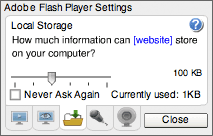
SS Video
Posted: Sun Jan 06, 2008 1:31 pm
by dusty
randymci,
Thank you. Now I know how to get myself into even more trouble.
Getting to the screen you showed wasn't quite as direct but I got there and I see what you mean. I even came upon a tutorial by Adobe that further explained the new found options.
I had to click on Help (Question Mark) to get to a Flash Player Help file and then the appropriate topic (in this case "Local Storage Settings"). But then I guess you already knew all of that.
Every time I see a new screen, I guess I need to "click on" everything there. No telling what I might find.
Isn't it amazing what an old man can learn while doing wood working?
Posted: Sun Jan 06, 2008 1:40 pm
by a1gutterman
Hi Dusty,
I am not looking for a solution to my viewing problem; I was answering a question. I have Windows XP, IE 7.0.5730.13IC along with all of the updates to all programs in question. I am sure there is no problem with my system short of the connection. In a post made a short time ago, someone from SS actually stated that the recorded sessions are broadcast from a different location using different equipment then the live sessions. As I recall, they know that there is a difference and that a superior connection is required to view the recorded versions. I will look for that post.
edit:My recollection of the post that I was referring to was not quite what I thought it was:
Video link fixed -- again -- I hope.
Yes, the live streaming is done in Windows Media and the on-demand videos are delivered in Flash; we tell you that on the Test Page. There is something that we don't mention, however, and maybe we should. The test video is delivered to you from Shopsmith's server, while the live stream is delivered from a special streaming server in California. Their code, our streaming service tells us, works on both PC and Mac platforms -- they've tested it it, they swear on a stack of HTML manuals. Our server obviously doesn't provide the same Internet environment as their server, otherwise we could do the streaming here. My suggestion is that you might sign up for a class anywho and see if the live stream from California works for you.
With all good wishes,
__________________
Nick Engler, Director
Shopsmith National Woodworking Academy
sorrry for the misinformation
Having said all of that, I will now try my hand at the above mentioned settings that randymci and Dusty are talking about.
Thank you!
Posted: Sun Jan 06, 2008 2:00 pm
by charlese
Thank you very much for showing us older, not so in tune guys, how to increase our buffering size. Like others, I didn't know one could do that, let alone how!.
Posted: Sun Jan 06, 2008 2:07 pm
by dusty
I'm in tune, charlese. It's just that no one else hears the same music that I hear.

Posted: Sun Jan 06, 2008 2:20 pm
by Nick
Tim, you may want to review our FAQ at
http://www.shopsmithacademy.com/FAQ.html . It will explain what software you need for which webcast. You also may want to do a little checking up on your web services. Not all DSL and cable services are created equal. More to the point, not all are created equally honest. The industry is rife with reports of people who thought they were paying for one kind of connection and were in fact getting another, somewhat lesser substitute. You might start by testing your upload and download speeds here:
http://www.speakeasy.net/speedtest/ . See if they compare to what you are paying for.
PS -- You may not be be able to view these videos smoothly if your download speed is less than 300K.
With all good wishes,
Download Speeds, for SS Video Viewing
Posted: Sun Jan 06, 2008 2:35 pm
by dusty
Which server is typical?
Does it make any difference that upload and download speeds are so much different? New York for example: Download speed is 1439 kbps while Upload speed is only 115 kbps.
I assume that my computer is the primary pacing factor on Upload speed.
Posted: Sun Jan 06, 2008 2:36 pm
by a1gutterman
Nick wrote:Tim, you may want to review our FAQ at
http://www.shopsmithacademy.com/FAQ.html . It will explain what software you need for which webcast.
I did check it just now as you suggested: I have all of the required "stuff".
You also may want to do a little checking up on your web services. Not all DSL and cable services are created equal. More to the point, not all are created equally honest. The industry is rife with reports of people who thought they were paying for one kind of connection and were in fact getting another, somewhat lesser substitute.
I have said all along]
You might start by testing your upload and download speeds here: http://www.speakeasy.net/speedtest/ . See if they compare to what you are paying for.
I have checked there and other places. My speeds are slow. I am able to see the live sessions okay, so I am good. It is just the already recorded ones that I have a problem with. When SS makes available the recorded sessions on DVD, I will be a customer.
PS -- You may not be be able to view these videos smoothly if your download speed is less than 300K.
With all good wishes,
My first post on this thread was an attempt to try and help baysidebob's problem. I hope he is reading these suggestions. Thanks all for your help.