Page 1 of 1
Sketchup Question
Posted: Mon Oct 03, 2016 12:28 pm
by recurve1usa
I have just bought the small router table that sits on the end of the Shopsmith. I have downloaded a router fence drawing from sketchup whse.
I would like to build this router fence for the table I just bought.
When I load the plan into sketchup I can't see any dimensions. I have tried everything to show the dimensions and can't unless I use the tape measure tool. Does anyone know how to show the drawing with all the dimensions on it?
Thanks
John
Ps I bought my Shopsmith over thirty years ago and It is still chugging along and providing lots of fun and enjoyment.
Re: Sketchup Question
Posted: Mon Oct 03, 2016 12:44 pm
by reible
You are at the mercy of the provider of the model as to if there are dimensions or not. In some cases the drawing may look like it is correct but the dimensions may prove otherwise.
If it is not "protected" you can make/add your own measurements using the tools provided. Not sure how fluent you are in sketchup but it is this tool in case you need to know that:
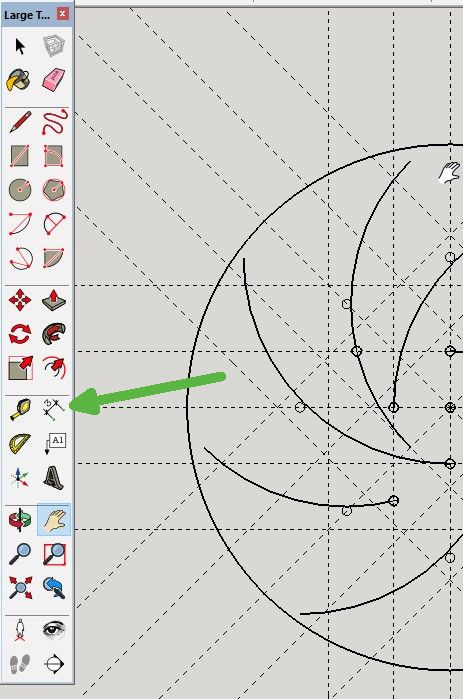
- 1bbbb.jpg (62.02 KiB) Viewed 4579 times
Ed
Re: Sketchup Question
Posted: Mon Oct 03, 2016 1:09 pm
by dusty
recurve1usa wrote:I have just bought the small router table that sits on the end of the Shopsmith. I have downloaded a router fence drawing from sketchup whse.
I would like to build this router fence for the table I just bought.
When I load the plan into sketchup I can't see any dimensions. I have tried everything to show the dimensions and can't unless I use the tape measure tool. Does anyone know how to show the drawing with all the dimensions on it?
Thanks
John
Ps I bought my Shopsmith over thirty years ago and It is still chugging along and providing lots of fun and enjoyment.
John, If you would be more specific about which router table you have down loaded, I will do the same. With it on my computer, I may be able to instruct you on how to retrieve the dimension. Dimensions are often stored on a layer that can be either hidden or showing. I just downloaded two different shetchup files from the warehouse. Both come with no dimensions showing but they are available.
On the screen that you downloaded, click on Window/Dimensions. On this screen check Layers.
If there is Layer 0 only, then the author did not include dimensions. If he had, they would be visible in the download (which is not typically done).
Re: Sketchup Question
Posted: Mon Oct 03, 2016 1:33 pm
by recurve1usa
Thanks Dusty;
There are layers and I was able to see all the dimensions on the plan.I have one more question. How do I pull apart the separate pieces so I can view them on their own without ruining the whole plan?
Thanks for all the help.You guys are the greatest group on the planet.
I think this fence is going to be a home run on this small table.
Re: Sketchup Question
Posted: Mon Oct 03, 2016 1:50 pm
by dusty
recurve1usa wrote:Thanks Dusty;
There are layers and I was able to see all the dimensions on the plan.I have one more question. How do I pull apart the separate pieces so I can view them on their own without ruining the whole plan?
Thanks for all the help.You guys are the greatest group on the planet.
I think this fence is going to be a home run on this small table.
If you tell me which plan you are downloading, I can help better.
If the author did not create components as he put the plans together, there is no simple when to pull the plans apart into their separate pieces.
Re: Sketchup Question
Posted: Mon Oct 03, 2016 2:15 pm
by recurve1usa
Hi Dusty;
Open sketchup and go to the three D whse. Search router table fence. The one I downloaded is by Kensgr.
I hope that isn't too difficult.
Here is the link, hope it works
https://3dwarehouse.sketchup.com/model. ... 9a1ecf7bbc
Thanks
Re: Sketchup Question
Posted: Mon Oct 03, 2016 4:42 pm
by dusty
Thanks for posting this. I have some studying to do. This guy has exposed me to some features in Sketchup that I did not know about.
Good luck on your project.
Re: Sketchup Question
Posted: Mon Oct 03, 2016 4:51 pm
by tenbears
All the dimensions are clearly shown by clicking on the Scene 6 button of the sketchup model from the link in this thread. Current version of Sketchup is Sketchup2016.
Re: Sketchup Question
Posted: Tue Oct 04, 2016 9:57 am
by recurve1usa
Thanks to everyone for your help. I am now able to see all the dimensions on the plan to build it for myself. This is a great forum where we can all learn from each other.
John