charlese,
I won't get your email until I get to my work computer tomorrow. But I did a test. I disabled Java in Firefox, and I tried to load the chat. I then got the same error message as you. So ensure that your Java is enabled.
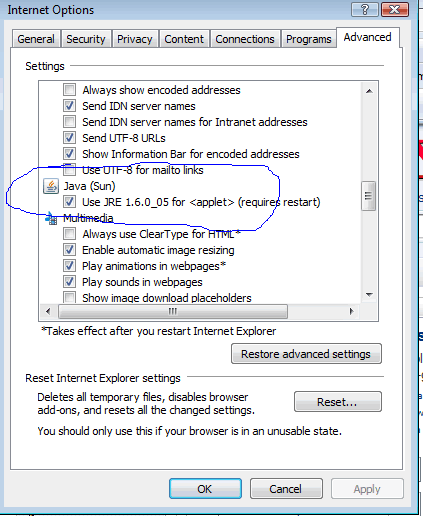
If you are using Internet Explorer, here is instructions copied directly from Help in Interent Explorer.
To disable or enable the Java virtual machine
Click to open Internet Explorer.
Click the Tools button, and then click Internet Options.
Click the Advanced tab.
If Java is installed, there will be a Java section in the Settings list. To enable Java, select the option under Java. To disable Java, clear the option under Java. When you are finished, click OK.
I have attached a picture of what the menu looks like in IE.
If you are using Firefox, the instructions are the same except you click "Content" rather than "Advanced".