Page 1 of 1
Past order information, how to find now?
Posted: Thu Jul 30, 2015 3:37 pm
by reible
I believe in the past I was able to find past orders online at the main shopsmith site. Now I see a place where I can enter an order number and phone number only. I don't have a current order number so I just put in a phone number and it replys with an error code. Perhaps that is because I didn't enter a order number???
Ed
Re: Past order information, how to find now?
Posted: Thu Jul 30, 2015 4:10 pm
by joedw00
It is called Personal Home Page. Under Woodworking Resources
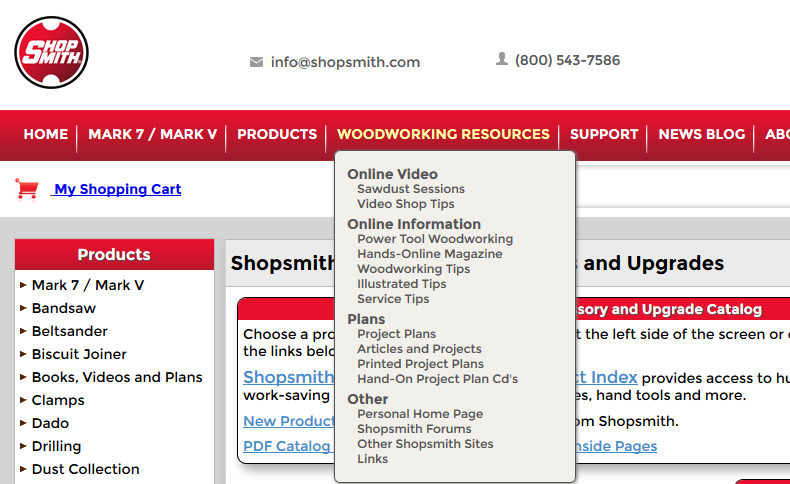
- personal home page.PNG (99.43 KiB) Viewed 1914 times
Re: Past order information, how to find now?
Posted: Thu Jul 30, 2015 5:07 pm
by everettdavis
As he illustrates:
Select Woodworking Resources Tab
Drop Down to Personal Home Page
Login
select the link on the left side that says "Click Here For Order Status and History"
All your orders should be there, though for whatever reason, sometimes the site errors out and you have to call them. Whatever they do, the system comes back at some point and you can retrieve them again. Whether it works or not, this is where they are.
Re: Past order information, how to find now?
Posted: Thu Jul 30, 2015 5:53 pm
by reible
Thank you both. I wanted to see when I ordered something and didn't want to dig into my stack of unfilled orders from the last couple of years(who has time to do the paper work??). This way I can just look it up and be done with it.
Ed
Re: Past order information, how to find now?
Posted: Thu Jul 30, 2015 6:21 pm
by joedw00
It is really a neat thing to have this information.
Re: Past order information, how to find now?
Posted: Sat Aug 01, 2015 1:04 am
by everettdavis
If you use this, click on an order to display it and have the same error I did, it seems it is related to the phone number being 0's as you can see highlighted with the red arrow in the graphic.
This process actually linked me to the very same result screen that order status does, but has no field entry for a phone number on the front end. I can't seem to locate a screen to edit my profile in this order section of the website so that it would capture and populate it.
I simply clicked at the end of the address bar, backspaced over the 0's and entered my area code and phone number (no dashes or spaces) then pressed enter.
It then displayed my order.
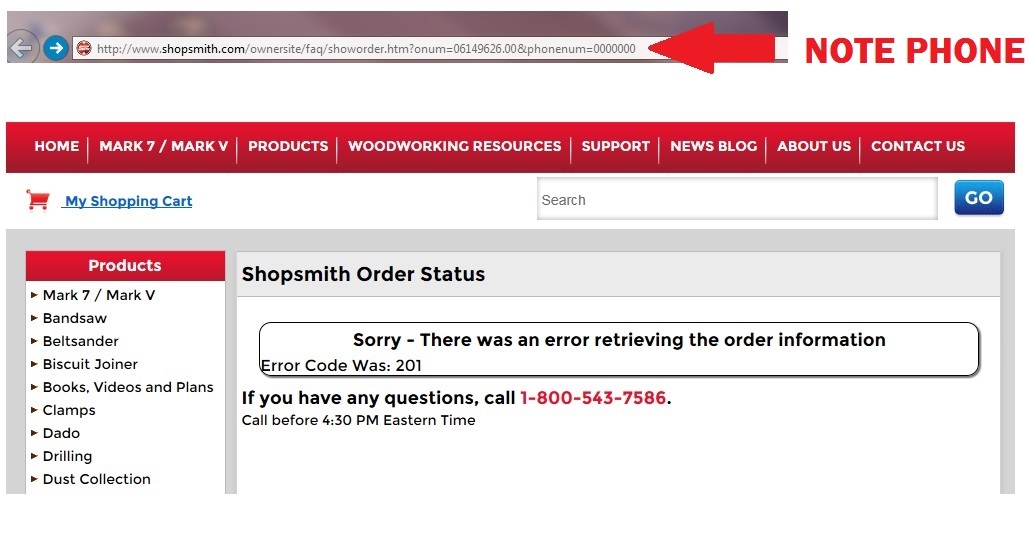
- Order Status Error.jpg (121.53 KiB) Viewed 1809 times
Re: Past order information, how to find now?
Posted: Sat Aug 01, 2015 2:43 pm
by Bruce
everettdavis wrote:If you use this, click on an order to display it and have the same error I did, it seems it is related to the phone number being 0's as you can see highlighted with the red arrow in the graphic.
This process actually linked me to the very same result screen that order status does, but has no field entry for a phone number on the front end. I can't seem to locate a screen to edit my profile in this order section of the website so that it would capture and populate it.
I simply clicked at the end of the address bar, backspaced over the 0's and entered my area code and phone number (no dashes or spaces) then pressed enter.
It then displayed my order.
Order Status Error.jpg
Good catch.