Page 1 of 1
A Couple Very Worthy Computer Tools
Posted: Tue Sep 08, 2015 12:34 pm
by dusty
I have done a significant amount of computer work during this time when I was recovering from surgery. I had lifting restrictions and a care giver who was constantly watching to see what I was doing. I didn't have a chance. Since I could not get to the shop without causing a fuss, I worked on a couple computers. I used the expertise on a couple computer forums to resolve some of my problems and I picked up a couple tools.
If you are interested, they are free downloads.
https://www.piriform.com/speccy/download
https://technet.microsoft.com/en-us/sys ... 42062.aspx
Re: A Couple Very Worthy Computer Tools
Posted: Tue Sep 08, 2015 3:41 pm
by tomsalwasser
Hi Dusty,
The speccy program looks like a dandy system information display. I could use that. I'm not sure how I would use the sysinterals system.
How did these 2 programs help you fix your computer?
Best,
Tom
PS I hope you're feeling better and back in the shop soon.
Re: A Couple Very Worthy Computer Tools
Posted: Tue Sep 08, 2015 4:10 pm
by dusty
tomsalwasser wrote:Hi Dusty,
The speccy program looks like a dandy system information display. I could use that. I'm not sure how I would use the sysinterals system.
How did these 2 programs help you fix your computer?
Best,
Tom
PS I hope you're feeling better and back in the shop soon.
Speccy does not help fix the problems. It did however alert me to the fact that I had an overheat problem. I've always watched the temperatures at turn on. The bios had I use displays the critical temperatures all be it for a very short time. Prior to realizing the over temperatures, the computer was unstable and shut down occasionally for no obvious reason. I have not had a shut down now in nearly a month and I watch the temperatures closely since they are now so easy to display.
On a different computer, everything was like in slow motion. It took forever to boot, it took forever to shut down and it was slow accessing the internet.
Sysinternals let you see what is consuming CPU time, what is consuming memory capacity and which PIDS are involved. By knowing that, I was able to disable or delete applications that were causing problems.
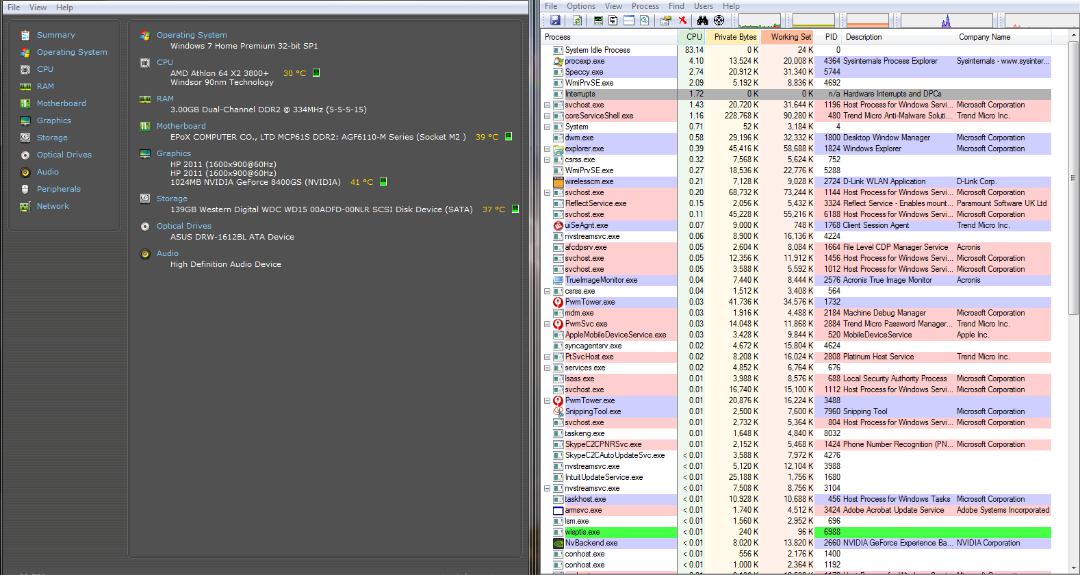
- Capture System Performance.PNG (287.08 KiB) Viewed 1114 times
Re: A Couple Very Worthy Computer Tools
Posted: Tue Sep 08, 2015 4:30 pm
by dusty
A couple more tools that are available.
Re: A Couple Very Worthy Computer Tools
Posted: Tue Sep 08, 2015 5:01 pm
by rjent
Like I pointed out in this thread
http://www.shopsmith.com/ss_forum/viewt ... rm#p192672
the Piriform utilities are great. I have been using them and providing clients with them for years. Glad you found them!
