Page 1 of 2
Firefox Issue
Posted: Sun Oct 18, 2015 8:08 am
by algale
I recently had some computer problems and had to reinstall Firefox. Ever since, it has at random times shrunk the active window as if I were clicking on the "Restore/Down" icon (between the minimize and close icon). A minor annoyance but one I'd like to fix. Any of you computer gurus have any ideas what's going on?
Oh, I am running on an ancient laptop using Windows NT.
Re: Firefox Issue
Posted: Sun Oct 18, 2015 10:26 am
by JPG
Not me!
I
never use full screen!

Re: Firefox Issue
Posted: Sun Oct 18, 2015 10:39 am
by Gene Howe
Why?
JPG wrote:Not me!
I
never use full screen!
Re: Firefox Issue
Posted: Sun Oct 18, 2015 11:00 am
by JPG
When you 'run' full screen, you 1)only have a single program's screen visible, 2)do not have access to any other program's icon on the screen(to 'launch' additional programs).
Realize I do not let Windows arrange my icons either. They are arranged(by me) around the edge of the screen.
Just call me a contrarian!

Oh and the task bar is on the right edge.
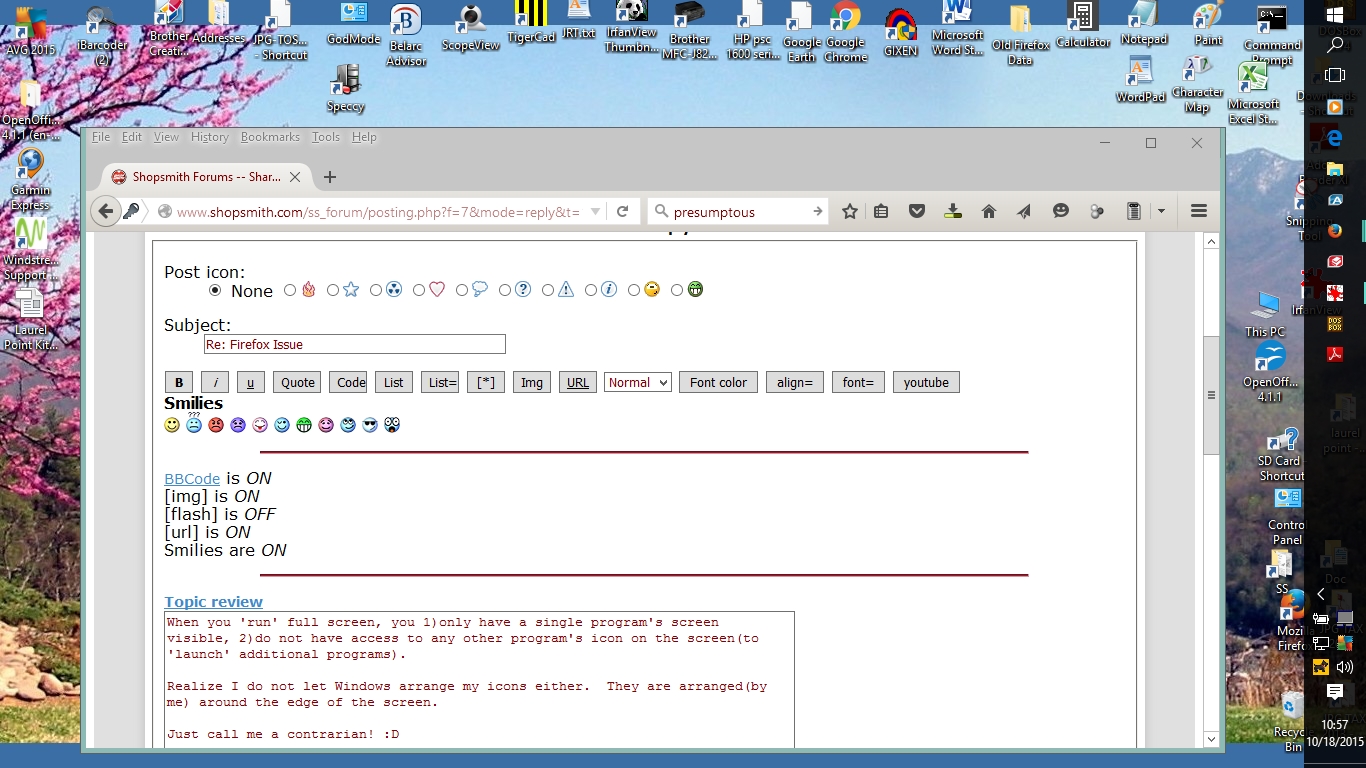
- Clipboard01.jpg (451.02 KiB) Viewed 1023 times
Re: Firefox Issue
Posted: Sun Oct 18, 2015 11:06 am
by garys
JPG wrote:When you 'run' full screen, you 1)only have a single program's screen visible, 2)do not have access to any other program's icon on the screen(to 'launch' additional programs).
I put my other program icons in the taskbar so I can run full screen and still have access to the icons. One click on the icon in the taskbar brings up additional programs as I want them.
If you are having issues with Firefox minimizing by itself, look into what hotkeys you have set up. There might be a keystroke that is minimizing the window for you.
Re: Firefox Issue
Posted: Sun Oct 18, 2015 1:06 pm
by algale
garys wrote:JPG wrote:When you 'run' full screen, you 1)only have a single program's screen visible, 2)do not have access to any other program's icon on the screen(to 'launch' additional programs).
I put my other program icons in the taskbar so I can run full screen and still have access to the icons. One click on the icon in the taskbar brings up additional programs as I want them.
If you are having issues with Firefox minimizing by itself, look into what hotkeys you have set up. There might be a keystroke that is minimizing the window for you.
Hmmm. I've adjusted the touchpad settings and will see if that solves the issue. Thanks.
Re: Firefox Issue
Posted: Sun Oct 18, 2015 2:14 pm
by Beave2012
It will either be the keystroke using control key typically, or if it's like my case, your wrist hits the TouchPad and causes anarchy with your pc. Since it only started with Firefox, go through all the settings in the program and see what causes it to minimize.
The only other issue, since it's only in Firefox, would be any installed plug-ins you may have.
Re: Firefox Issue
Posted: Sun Oct 18, 2015 2:30 pm
by JPG
garys wrote:
I put my other program icons in the taskbar so I can run full screen and still have access to the icons. One click on the icon in the taskbar brings up additional programs as I want them.
. . .
And you still only have visibility to one at a time if 'full screen'.
When you place them on the task bar, are you not also 'loading' them?I(using memory etc.)
Besides there is not room for 40+ icons there.
Windows is called that for a reason - notice it is plural.
Re: Firefox Issue
Posted: Sun Oct 18, 2015 3:47 pm
by Beave2012
JPG wrote:garys wrote:
I put my other program icons in the taskbar so I can run full screen and still have access to the icons. One click on the icon in the taskbar brings up additional programs as I want them.
. . .
And you still only have visibility to one at a time if 'full screen'.
When you place them on the task bar, are you not also 'loading' them?I(using memory etc.)
Besides there is not room for 40+ icons there.
Windows is called that for a reason - notice it is plural.
Placing shortcuts on the Taskbar does not load them and takes up no memory. Only if you start the program and leave it running.
I only use window mode when I need 2 pieces of info at the same time (such as quoting information) otherwise alt-tab does fine for me.
I personally only use about 3 desktop shortcuts and the rest just sit there, I can use the start menu for all non-mainstream tasks.
Use whatever interface you are comfortable with.
And Btw full screen in most programs is windowed full screen mode. True full screen mode forces you to either quit before accessing other programs. That's what made windows so nice when it came out, we could multitask without shutting down the current program, so slick.
Re: Firefox Issue
Posted: Sun Oct 18, 2015 5:56 pm
by garys
Beave2012 wrote:
I only use window mode when I need 2 pieces of info at the same time (such as quoting information) otherwise alt-tab does fine for me.
I don't know if Windows has this feature, but the Linux desktops have a window switcher in the taskbar. Active programs show up in the taskbar when they are running. A simple single click on the icon of the program you want brings any running window to the front for use. It does a similar function to ALT-TAB, but is easier to use as it doesn't require cycling through all active windows.
Also, there is a workspace switcher that allows you to set up multiple full screen workspaces. The workspace switcher sits in the taskbar and you can run a full screen application in each workspace. A single click on the desired workspace puts that one on your screen.