Page 1 of 1
Scam or no scam??
Posted: Sat Dec 01, 2018 1:48 pm
by wa2crk
Lately I have been getting an alert on my computer that my version of windows 10 is corrupted and needs to be repaired. It tries to get me to click on a link for the repair to start. I can't get it to clear unless I shut down the internet and restart the browser. Does anyone else think this is a scam?

Anyone else get these messages?
Bill V
Re: Scam or no scam??
Posted: Sat Dec 01, 2018 2:09 pm
by chapmanruss
Yes it is a scam. They are trying to get you to let them into your computer. Get some good anti-virus and online protection. You did the right thing by shutting down your internet connection. They do a similar one by calling on the phone and telling you you have a problem on your Microsoft or Apple computer. Don't even talk to them, just HANG UP.
Re: Scam or no scam??
Posted: Sat Dec 01, 2018 2:57 pm
by jsburger
I agree with Russ. From the way you worded it I assume you are getting a pop up window with the warning. You have probably gotten some kind of virus. What antivirus software are you running?
I run ESET NOD32 Antivirus and Malware Bytes premium (paid licenses) on all my computers and have never had a problem in years. Both programs have a free version. It would be well worth it to install them and see what they find.
Re: Scam or no scam??
Posted: Sat Dec 01, 2018 3:06 pm
by beeg
SCAM SCAM SCAM SCAM
Re: Scam or no scam??
Posted: Sat Dec 01, 2018 3:12 pm
by garys
Do you get this on one specific web page or on random sites? If it comes from a particular page, it is likely just a popup to sell you antivirus software or some other useless software. In this case, it is harmless unless you follow their link. You should be able to prevent seeing it again by using Adblock on your browser. Here's one I found years ago. If you look at the screen, it is trying to peddle a useless scanner for Windows, but it is on a Linux computer.
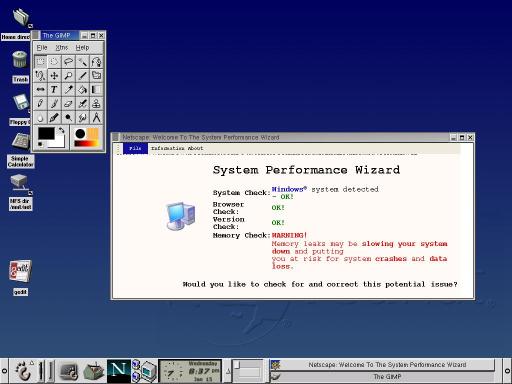
- Oh-oh.jpg (25.66 KiB) Viewed 9710 times
If it comes from random sites, you likely have spyware or a virus already on your computer. You should scan your machine for crap and see if anything turns up.
Re: Scam or no scam??
Posted: Sat Dec 01, 2018 3:25 pm
by dusty
wa2crk wrote:Lately I have been getting an alert on my computer that my version of windows 10 is corrupted and needs to be repaired. It tries to get me to click on a link for the repair to start. I can't get it to clear unless I shut down the internet and restart the browser. Does anyone else think this is a scam?
Anyone else get these messages?
Bill V
If you are having problems take action on your own to initiate a repair.
If you have no issues, ignore them. There is no way to shut them down or out other than that.
Re: Scam or no scam??
Posted: Sat Dec 01, 2018 5:41 pm
by JPG
At the very least. down load 'Malwarebytes' and let it search for bad stuff.
Be aware that scan may take a veeery long time.
Re: Scam or no scam??
Posted: Sat Dec 01, 2018 6:05 pm
by jsburger
dusty wrote:wa2crk wrote:Lately I have been getting an alert on my computer that my version of windows 10 is corrupted and needs to be repaired. It tries to get me to click on a link for the repair to start. I can't get it to clear unless I shut down the internet and restart the browser. Does anyone else think this is a scam?
Anyone else get these messages?
Bill V
If you are having problems take action on your own to initiate a repair.
If you have no issues, ignore them.
There is no way to shut them down or out other than that.
That is not true if he has a virus. If he is getting scam emails then they can be blocked but may take some effort. If emails, I just delete (ignore) them. A virus is another thing. It can be eliminated. If not it could do further damage.
Scam emails can be ignored and just deleted. A virus on your machine MUST be dealt with. Quality antivirus and anti-malware software is the answer. The quality programs do work in my experience.
Re: Scam or no scam??
Posted: Sun Dec 02, 2018 8:39 am
by Ed in Tampa
If it were me I would physically clear my browsers history, cache and shut it down then I would run windows defender, then I would shut the system down and do a cold start up.
If it happens again I would track the site I was in when it happens and avoid it.
The windows virus/malware program that comes with windows ten is one of the best, All I have used since windows 10 came out and I have not had a problem. I also use PC Clean to keep my caches and registry in clean state.
Pc clean will get rid of fake registry entries that many malware will install. I run both windows defender and pc clean until I get clean reports from both.