Anyone using V Carve software(CNC)

Moderator: admin

User avatar
reible
Platinum Member
Posts: 11283
Joined: Thu Jul 20, 2006 12:08 pm
Location: Aurora, IL

Anyone using V Carve software(CNC)

Post by reible »

I downloaded a demo version and played with for a little while tonight. Since I have no idea what I'm doing or how one should do this I put together a small project that seems to do what I want it to do as seen here:
ScreenHunter_71 Dec. 03 22.26sc.jpg
ScreenHunter_71 Dec. 03 22.26sc.jpg (43.46 KiB) Viewed 2673 times
But when I take the tool paths away it looks like this:
ScreenHunter_72 Dec. 03 22.29.jpg
ScreenHunter_72 Dec. 03 22.29.jpg (26.65 KiB) Viewed 2673 times
So I have I got something or just a mess?

I think I need to watch some videos or read up on this as I think a CNC might be in my future but I want to see how hard or easy it is to do the design in the software. Lots of things new to learn but we still have a long cold winter ahead so maybe even an old dog can learn something new.

Ed
{Knight of the Shopsmith} [Hero's don't wear capes, they wear dog tags]
User avatar
benush26
Platinum Member
Posts: 1104
Joined: Mon Mar 19, 2012 7:06 pm
Location: Montana

Re: Anyone using V Carve software(CNC)

Post by benush26 »

Hi Ed,

When a friend was learning to use his system, I watched and learned. The Vectric company software (which I think has both V-Carve and Aspire :confused: ) included a DVD (three I think) with a complete tutorial on how to set up the software and when to use (or not use) specific functions. I know they have a site on YouTube because I just checked.

One thing I could not get through my thick head was constant contact milling versus picking up the head and moving it. Just by looking at your "finished product" rendering I seem to recall a way to have the surface color different than the routed section, or maybe it was the other way around. :confused:

Sorry, its been over three years and much is fuzzy.

Anyway, if you check the Vectric site I am guessing they still have a huge amount of material.

Be well,
Ben
User avatar
reible
Platinum Member
Posts: 11283
Joined: Thu Jul 20, 2006 12:08 pm
Location: Aurora, IL

Re: Anyone using V Carve software(CNC)

Post by reible »

I guess this is the software that I would be using if I did get the cnc machine I'm looking at because it comes with it for "free" and after the cash for the machine I don't want to have to spend more to get some other software.

I'll check out their site and utube. I was thinking it sure would be nice if you could import things from sketchup but I think that might be too much to hope for.

Been wrapped up in paper work this morning and now I want some shop time but perhaps tonight I'll take another look at things.

If all goes well when I do our taxes this year I might find the funds in Feb. or so. That is unless something better comes along.

Thanks for the response.

Ed

benush26 wrote:Hi Ed,

When a friend was learning to use his system, I watched and learned. The Vectric company software (which I think has both V-Carve and Aspire :confused: ) included a DVD (three I think) with a complete tutorial on how to set up the software and when to use (or not use) specific functions. I know they have a site on YouTube because I just checked.

One thing I could not get through my thick head was constant contact milling versus picking up the head and moving it. Just by looking at your "finished product" rendering I seem to recall a way to have the surface color different than the routed section, or maybe it was the other way around. :confused:

Sorry, its been over three years and much is fuzzy.

Anyway, if you check the Vectric site I am guessing they still have a huge amount of material.

Be well,
Ben
{Knight of the Shopsmith} [Hero's don't wear capes, they wear dog tags]
roy_okc
Platinum Member
Posts: 814
Joined: Tue Jan 16, 2007 7:15 pm
Location: Moore, OK

Re: Anyone using V Carve software(CNC)

Post by roy_okc »

Hi Ed,

There are a variety of things that could be causing you not to get what you're hoping to see. The previews in VCarve Pro tend to be very accurate representations of what you will get, but sometimes they can be a bit hard to see.

Did you try to rotate the preview's display?

Looking at the toolpath preview, I suspect one or more of a few things may be affecting the output (assuming it is more than just the display angle):
- Your depth of cut may be too shallow
- Your bit diameter is too large for the detail
- Your bit type may be wrong (may want a combination of v-bit and end mill)

I'm going to PM my personal email to you. If you'd like, I can take a look at it and see if I can see any problems.

Roy
Roy

Mark V/510, Mark V/500 with parts for 510 upgrade, bandsaw, jointer, belt sander, DC3300 w/1 micron bag
Sawstop 3HP 36" PCS w/router table insert
Home designed and built CNC router, another CNC router :D desktop size, Avid 5x10 Pro CNC w/ATC, CNCed G0704 milling machine
Laser engraver
Way too much other stuff and not enough space :rolleyes:
User avatar
reible
Platinum Member
Posts: 11283
Joined: Thu Jul 20, 2006 12:08 pm
Location: Aurora, IL

Re: Anyone using V Carve software(CNC)

Post by reible »

For educational purposes I have created this file and should someone who knows what to do with it would like to play with it and get back to me that would be great.

This is the file I used to create the file that produced the results shown. This is not a v carve file but can be used as a bit map to create a project.
IMG_20151202_0004neg.pdf
(97.36 KiB) Downloaded 347 times
Ed
{Knight of the Shopsmith} [Hero's don't wear capes, they wear dog tags]
roy_okc
Platinum Member
Posts: 814
Joined: Tue Jan 16, 2007 7:15 pm
Location: Moore, OK

Re: Anyone using V Carve software(CNC)

Post by roy_okc »

Ed sent his file, however I wasn't awake enough when I replied to remember that the trial version files can't be opened in non-trial software on other computers. It will open in full versions on the same version.

I did this in Aspire, however, the same methods are available in VCarve Pro.

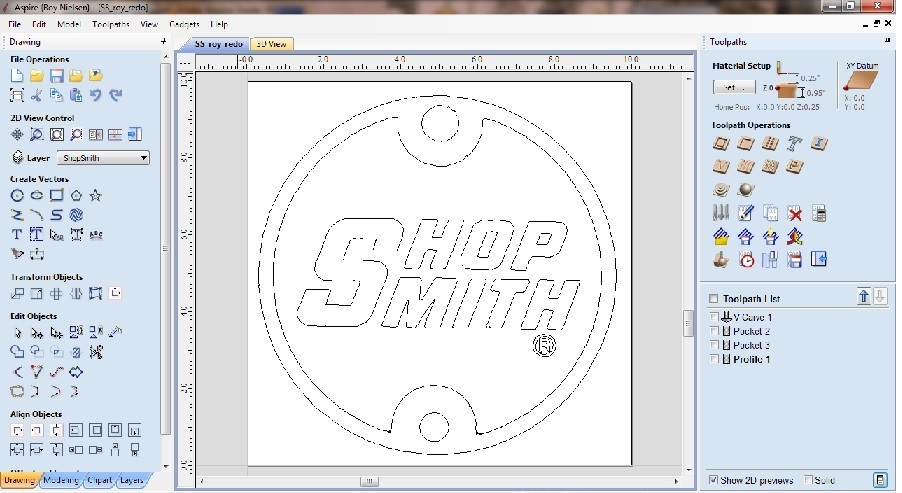
Created a new job, made the material size 10" x 10".

Copied graphic from PDF onto the drawing area.

Traced the bitmap. There were a lot of extraneous vectors from noise that I didn't want, so I moved the vectors that I wanted to keep to a new layer, then deleted the original layer with its trash and the bitmap layer.

If this were a real project that I was doing, I would have cleaned up the vectors as needed.

This left me with the vectors, image below, ready to set up the toolpaths.
CNC_Shopsmith_01.jpg
CNC_Shopsmith_01.jpg (133.43 KiB) Viewed 2526 times
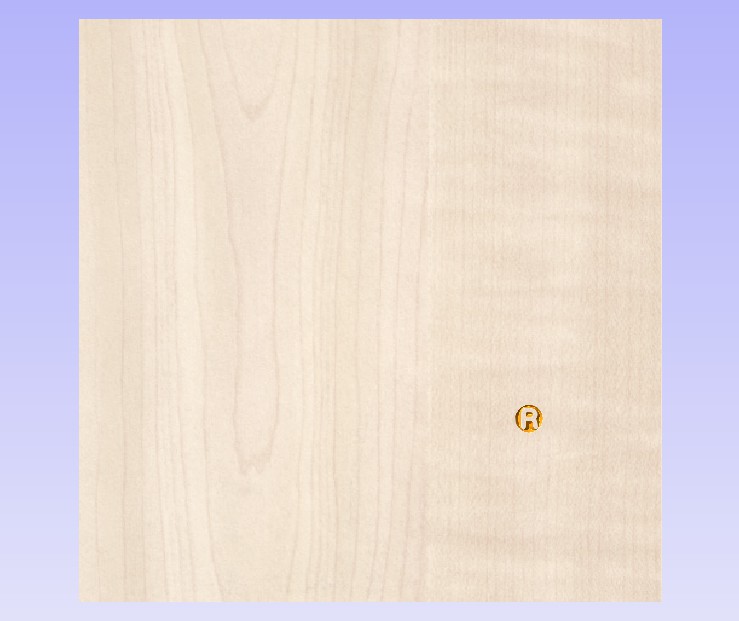
I knew that the area of the Registered could not be pocketed as most of the areas would be too small for a flat end mill. The solution is to vcarve the area using a v-bit. I want to do this toolpath first, all other toolpaths will use the same bit so I wouldn't have to change bits more than once during the job.

To vcarve the Registered symbol, I selected all of the (R) vectors except the outermost circle. Then, I selected the VCarve Toolpath tool, selected a 90 degree v-bit, calculated, and previewed (image below). I changed the machined area color to orangeish to make it easier to see the removed area.
CNC_Shopsmith_02.jpg
CNC_Shopsmith_02.jpg (53.49 KiB) Viewed 2526 times
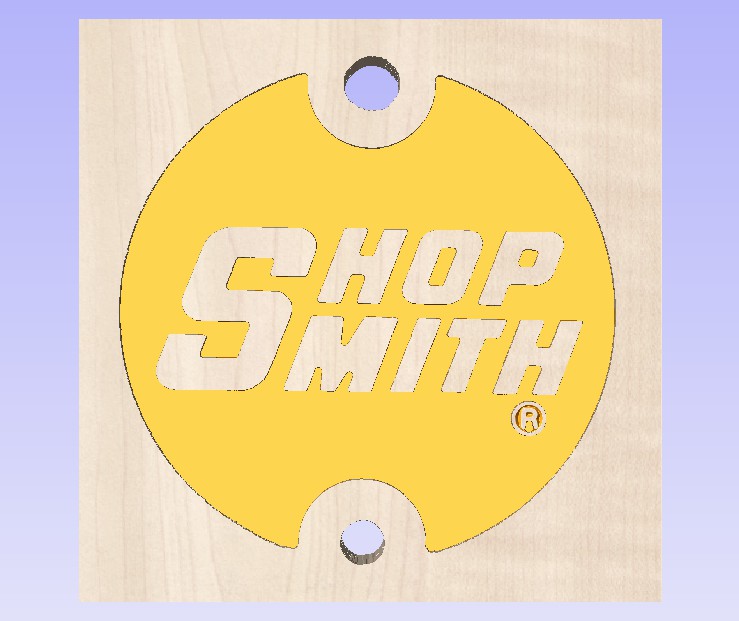
The next thing I wanted to work was to pocket the Shopsmith area. I selected the letters, the inner big circle and the outer (R) circle, clicked on the pocket tool, set depth to 0.10", selected a 1/8" end mill which I will use for the rest of the process, created the toolpath and ran the preview, below.

CNC_Shopsmith_03.jpg
CNC_Shopsmith_03.jpg (66.12 KiB) Viewed 2526 times
I'm assuming that the upper and lower holes are through-holes. With the size of this project, the mill size (1/8) must be considered against the hole size. I could have used a profile cut, but I would have had to leave tabs in place so that the waste material didn't come loose and potentially damage the mill; however, these tabs must be cut out by hand and cleaned up. I instead chose to pocket the hole completely out which will take longer to machine but probably save that back versus hand cleanup. I selected the two holes, ran the pocket tool, set depth to material thickness, generated the toolpath and preview, below.
CNC_Shopsmith_04.jpg
CNC_Shopsmith_04.jpg (67.73 KiB) Viewed 2526 times
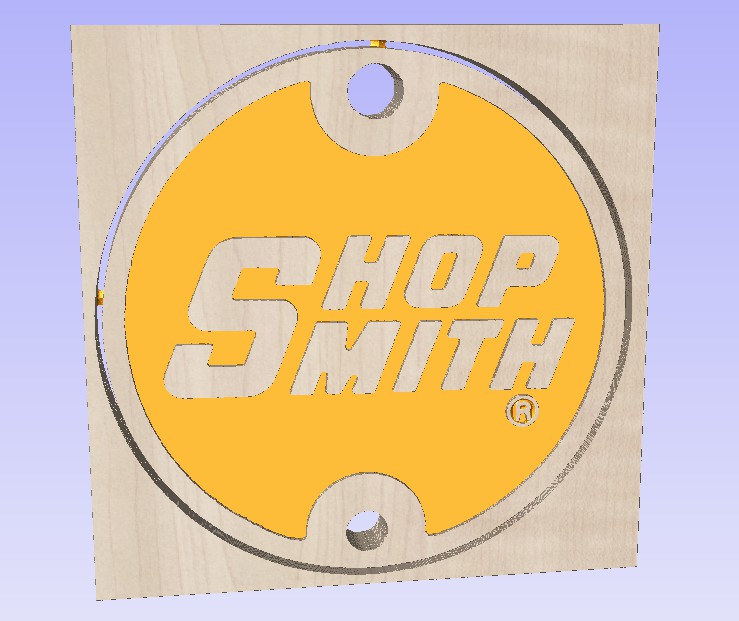
The last job was to cut the project out of the material by selecting the outermost circle and using the Profile tool, same bit, depth set to material thickness, I added four tabs, generated the toolpath and preview, below.
CNC_Shopsmith_05.jpg
CNC_Shopsmith_05.jpg (80.71 KiB) Viewed 2526 times
The following images were rotated so that I can better see the depth and the tabs from the back. If I desired, I could modify, delete, add, whatever and regenerate the toolpaths and preview.

CNC_Shopsmith_06.jpg
CNC_Shopsmith_06.jpg (78.03 KiB) Viewed 2526 times
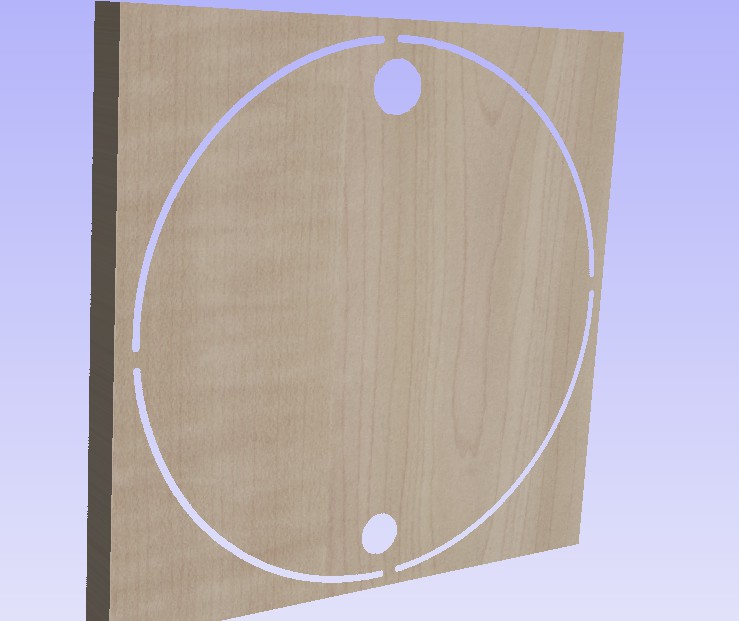
CNC_Shopsmith_07.jpg
CNC_Shopsmith_07.jpg (58.56 KiB) Viewed 2526 times
Roy

Mark V/510, Mark V/500 with parts for 510 upgrade, bandsaw, jointer, belt sander, DC3300 w/1 micron bag
Sawstop 3HP 36" PCS w/router table insert
Home designed and built CNC router, another CNC router :D desktop size, Avid 5x10 Pro CNC w/ATC, CNCed G0704 milling machine
Laser engraver
Way too much other stuff and not enough space :rolleyes:
roy_okc
Platinum Member
Posts: 814
Joined: Tue Jan 16, 2007 7:15 pm
Location: Moore, OK

Re: Anyone using V Carve software(CNC)

Post by roy_okc »

Slightly off topic, Vectric has their annual advent calendar of free drawings running right now at http://www.vectric.com/cool-stuff/vectr ... /index.php. These will work in VCarve Pro and Aspire, not sure about others.

In past years, they start closing the availability of earlier days as the month progresses, but it appears that the first days are still available.
Roy

Mark V/510, Mark V/500 with parts for 510 upgrade, bandsaw, jointer, belt sander, DC3300 w/1 micron bag
Sawstop 3HP 36" PCS w/router table insert
Home designed and built CNC router, another CNC router :D desktop size, Avid 5x10 Pro CNC w/ATC, CNCed G0704 milling machine
Laser engraver
Way too much other stuff and not enough space :rolleyes:
User avatar
reible
Platinum Member
Posts: 11283
Joined: Thu Jul 20, 2006 12:08 pm
Location: Aurora, IL

Re: Anyone using V Carve software(CNC)

Post by reible »

Thanks Roy!

I had no problem with the tracing coming in clean. Maybe different software of levels that were set. Or maybe the fact it was a copy sent in the pdf format that caused some glitches.

I knew I was missing the webbing but wasn't sure how to do that. I did use a couple of different tools like a v-bit and a 1/8" end mill but went with a 1/4" end mill for the holes which I did not make through holes.

My Channel Master DVR+ arrived yesterday so I played with that instead of the software...... then today the wireless addition arrived so I want to install that......... not looking good for me learning the new software at least until tomorrow.

I want to reread your post several times but I think I did a lot of what you had done so maybe I'm not so far off beat. I used a depth of cut of .0625 which seems like what the actual part has, might look better with a deeper cut like yours has.

Ed
{Knight of the Shopsmith} [Hero's don't wear capes, they wear dog tags]
roy_okc
Platinum Member
Posts: 814
Joined: Tue Jan 16, 2007 7:15 pm
Location: Moore, OK

Re: Anyone using V Carve software(CNC)

Post by roy_okc »

Ed,

I think you are pretty close to having a nice badge designed. You just need to play around with the toolpathing a bit, testing various settings, etc., then previewing, probably with a different background color for the machined area to help you see it. Then rotate the design so you can better see the details.
Roy

Mark V/510, Mark V/500 with parts for 510 upgrade, bandsaw, jointer, belt sander, DC3300 w/1 micron bag
Sawstop 3HP 36" PCS w/router table insert
Home designed and built CNC router, another CNC router :D desktop size, Avid 5x10 Pro CNC w/ATC, CNCed G0704 milling machine
Laser engraver
Way too much other stuff and not enough space :rolleyes:
artman60
Gold Member
Posts: 125
Joined: Thu Nov 05, 2015 11:30 pm
Location: Pepperell Ma

Re: Anyone using V Carve software(CNC)

Post by artman60 »

I'm lurking and learning :)
The clock of life is wound but once.
Post Reply