Photos from the phone, how I did it
Moderator: admin
Photos from the phone, how I did it
There has been several discussions about posting photos here from phones. Some people have done it and other have not been quite so lucky(?)/skilled(?) so while far from an expert I will get us stated on another adventure.
I'm not all that phone savvy as I have only had limited experience and that is with a Samsung S5 which is running android 5.0. Other phones or versions of the android software might not work the same way and of course if you are using an apple device things will be very different.
So lets see how this goes. I used the phone to take a picture, I'll assume that we all know how to do that. Now this is how I resized it. While still in the camera mode mind you.
On my camera the last picture you tool resides in the lower right corner as shown here:
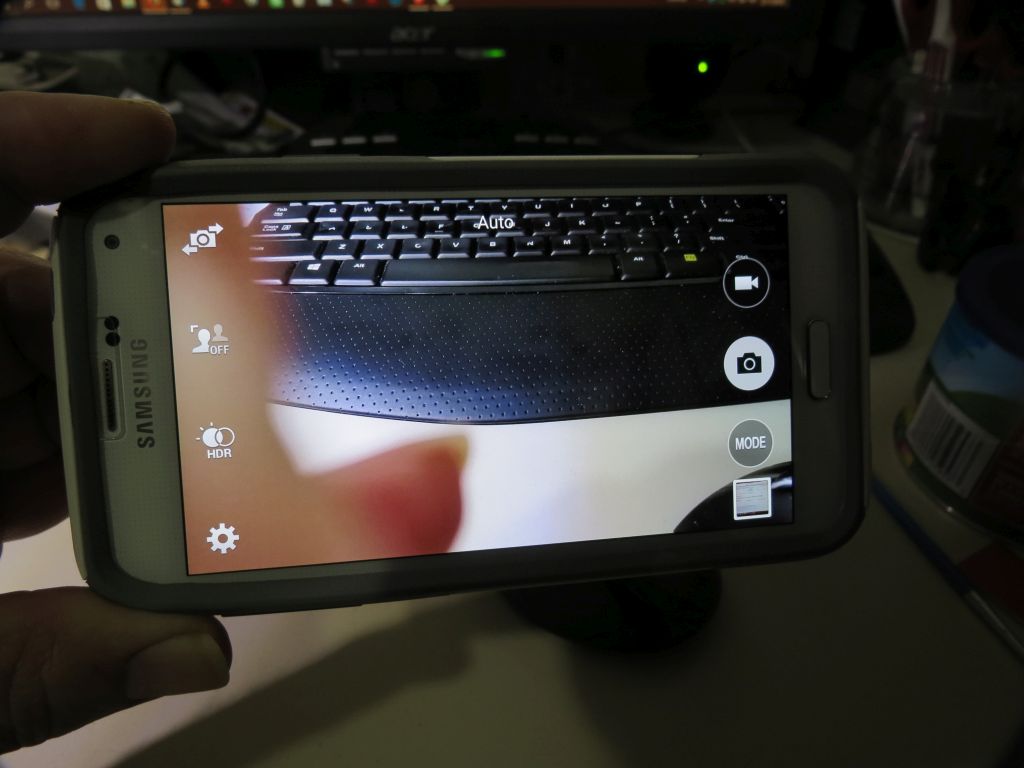
By touching that image it is brought up in a new window. As you can see in this picture I took a picture of my computer screen.
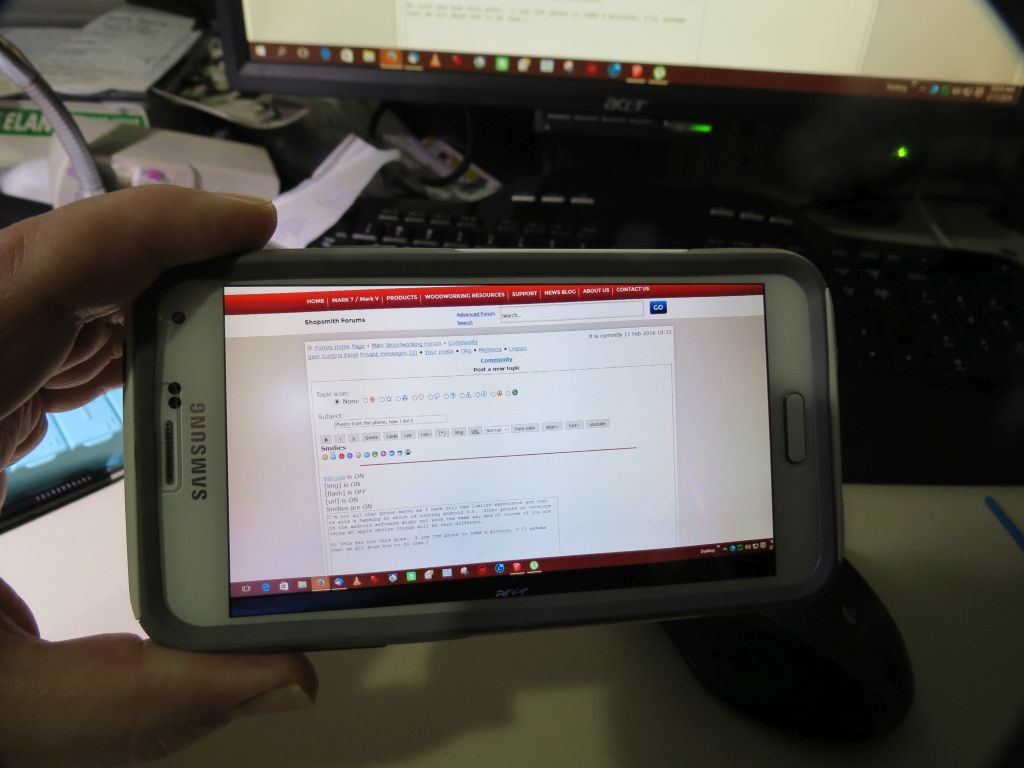
The camera has the option of editing the picture. When you touch the screen you have this come up.
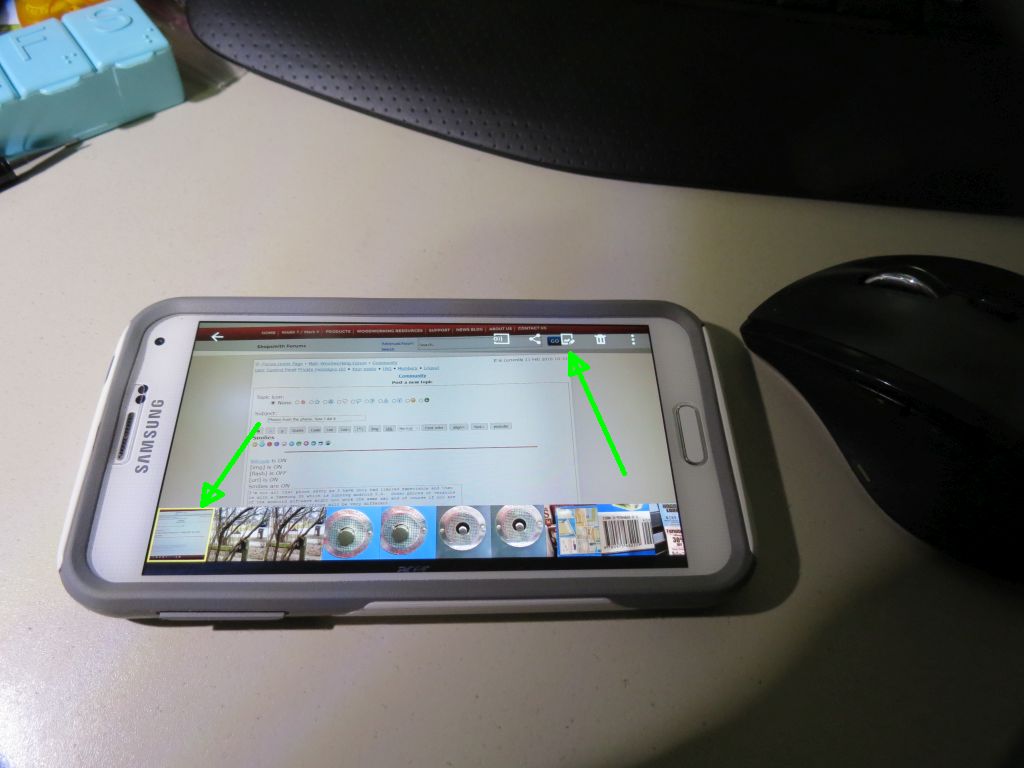
As you can see the other recent photo appear along the bottom but we still are interested in working with the one we just took. Along the top of the screen is the edit button, green arrow to the right. By touching that you are taken to this screen. The button you want is adjustments as indicated by the green arrow.
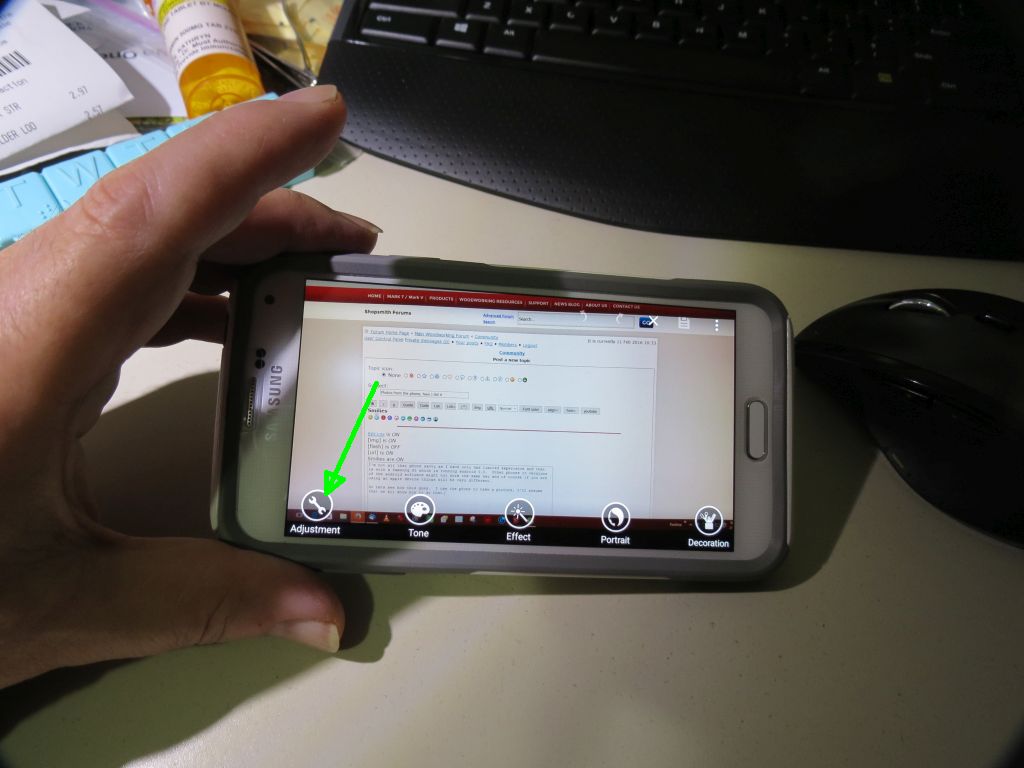
What now appears are a few choices and in this case I'm interested in the resize option.
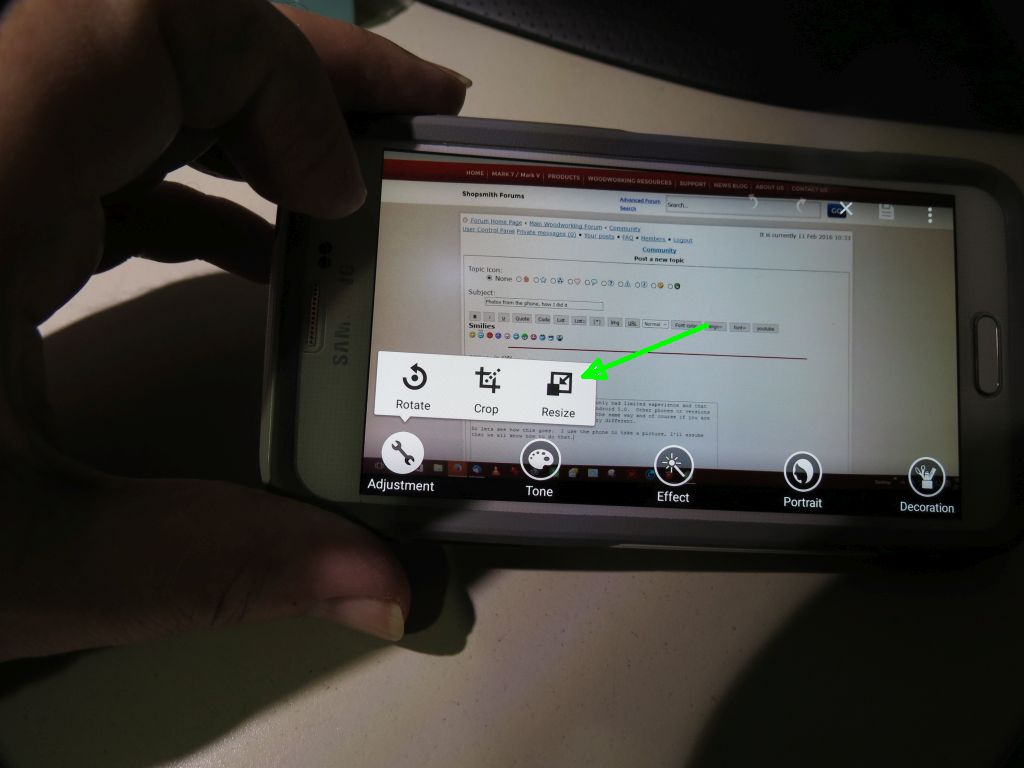
So you touch that and you go to this screen:
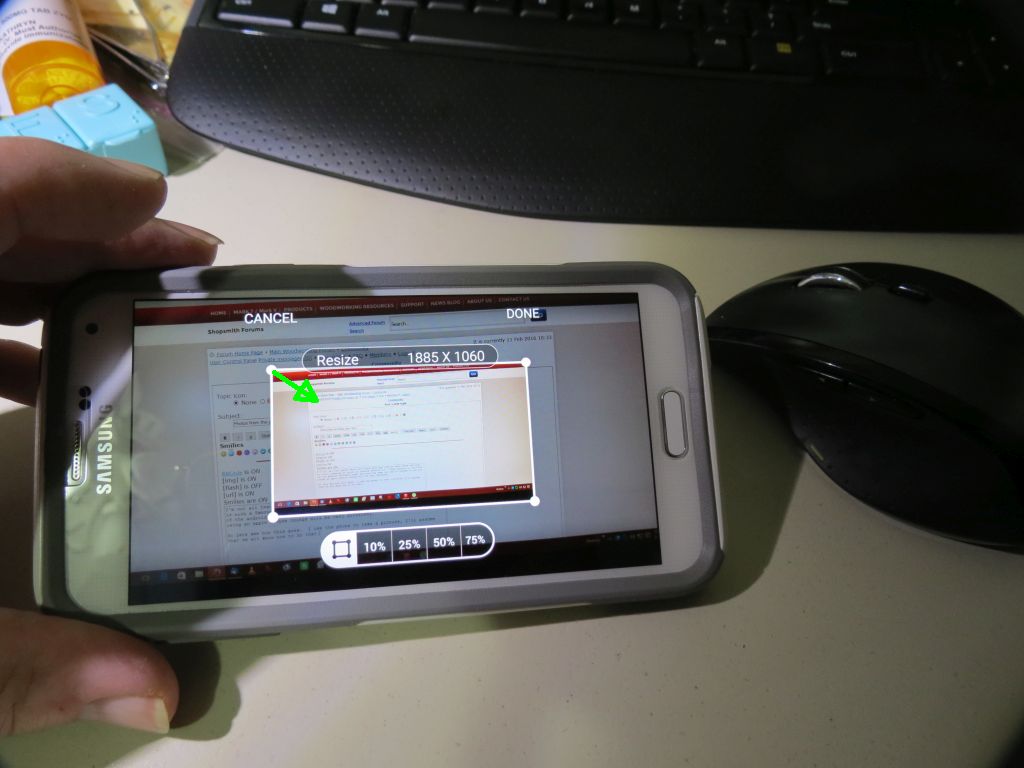
You can pick some size options or just drag from the corner as shown by the green arrow.
When you have the size you want as indicated on the screen you can hit the done button.
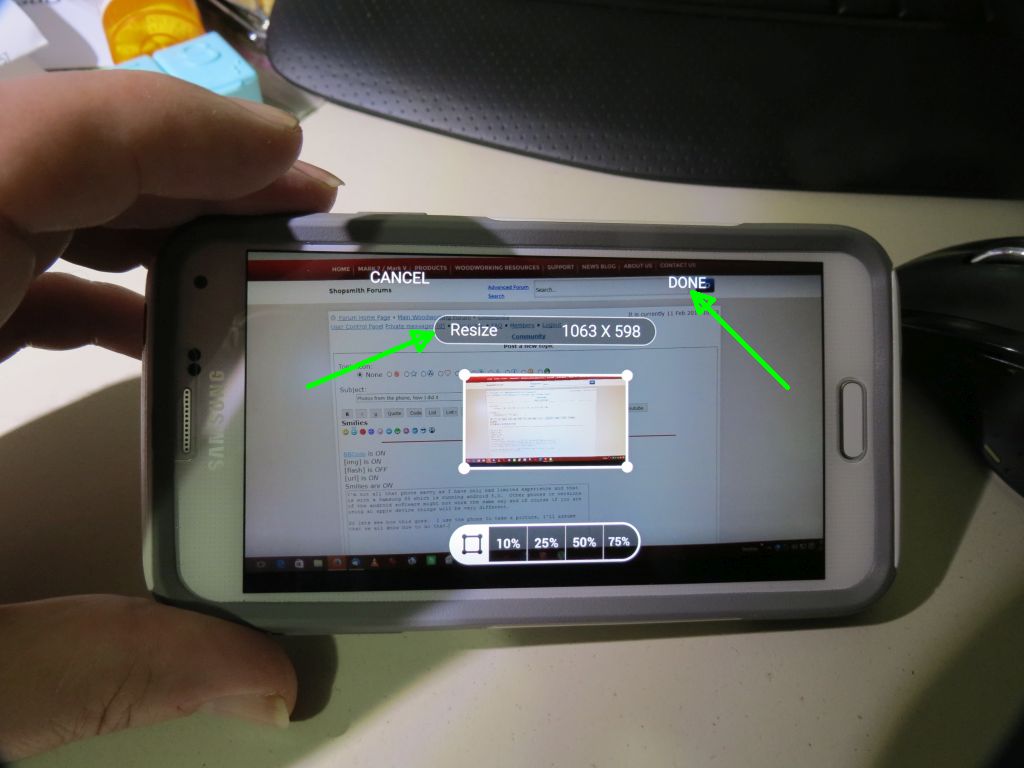
I now want to save it so I touch the icon pointed to by the green arrow.
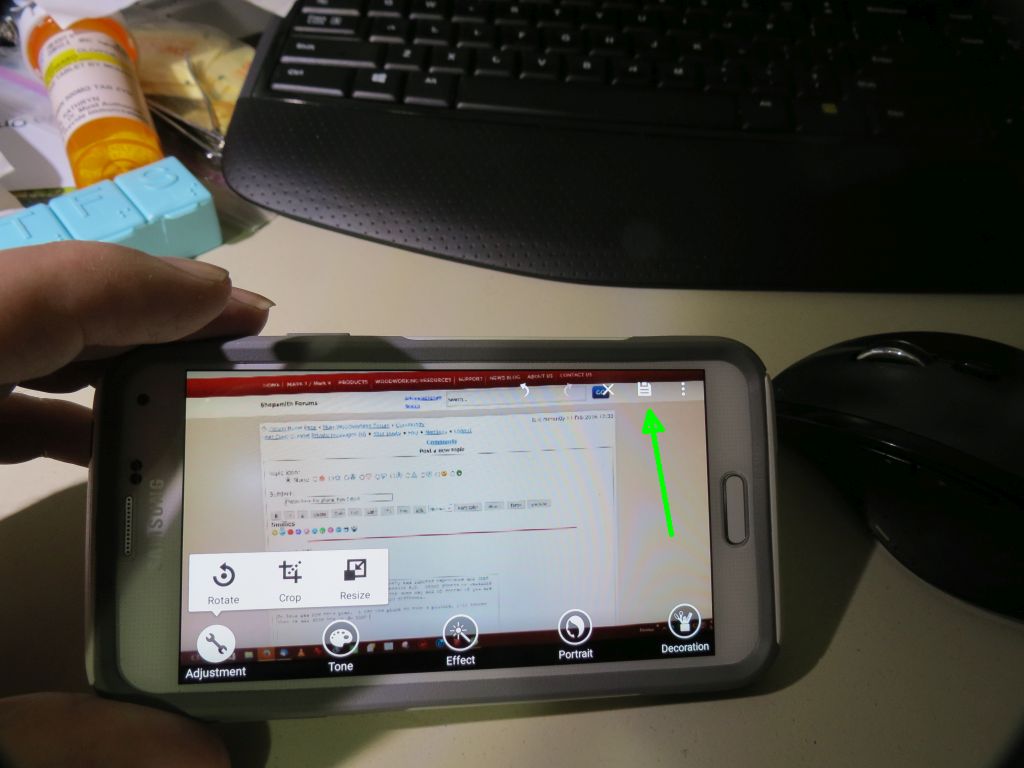
This brings you to another option and I picked the higher resolution.
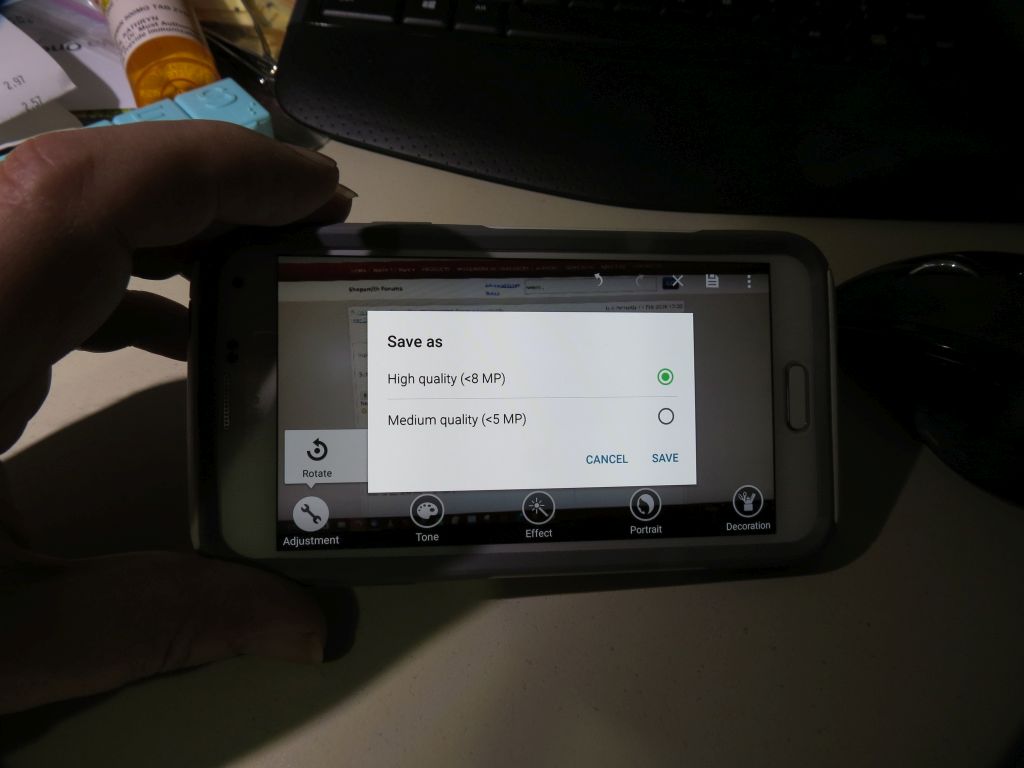
Then of course you need to touch the save icon.
In the next post I will go to my phone and attempt to post the photo we just finished.
Ed
I'm not all that phone savvy as I have only had limited experience and that is with a Samsung S5 which is running android 5.0. Other phones or versions of the android software might not work the same way and of course if you are using an apple device things will be very different.
So lets see how this goes. I used the phone to take a picture, I'll assume that we all know how to do that. Now this is how I resized it. While still in the camera mode mind you.
On my camera the last picture you tool resides in the lower right corner as shown here:
By touching that image it is brought up in a new window. As you can see in this picture I took a picture of my computer screen.
The camera has the option of editing the picture. When you touch the screen you have this come up.
As you can see the other recent photo appear along the bottom but we still are interested in working with the one we just took. Along the top of the screen is the edit button, green arrow to the right. By touching that you are taken to this screen. The button you want is adjustments as indicated by the green arrow.
What now appears are a few choices and in this case I'm interested in the resize option.
So you touch that and you go to this screen:
You can pick some size options or just drag from the corner as shown by the green arrow.
When you have the size you want as indicated on the screen you can hit the done button.
I now want to save it so I touch the icon pointed to by the green arrow.
This brings you to another option and I picked the higher resolution.
Then of course you need to touch the save icon.
In the next post I will go to my phone and attempt to post the photo we just finished.
Ed

{Knight of the Shopsmith} [Hero's don't wear capes, they wear dog tags]
Re: Photos from the phone, how I did it
I'm now using my phone. Let's see if it worked.
Ed
Ed
{Knight of the Shopsmith} [Hero's don't wear capes, they wear dog tags]
Re: Photos from the phone, how I did it
For the sake of completeness let me add the following information. I used the firefox browser to go to this site. I then located this post and added a new post. I now want to add the picture and this is where it all starts.
You scroll down to and touch the upload attachment icon.
This takes you to this screen:
You want to browse to find the picture.
Where do you want to look? The green arrow is where I went.
In my case I wanted to open from images as seen here:
I had two images here, one from yesterdays post and then the one I just worked on. I wanted to post that picture so it is the one I selected.
You now need to add the file.
You then locate where you want the picture placed, the cursor needs to be at the insert point, the touch the place here icon.
Then you end up by submitting the post as you always do.
So that is about all I have. I can't answer questions about other phones or even guess how they might work but I hope this will give you some ideas and perhaps some other good folks can add other tips and tricks.
Ed
You scroll down to and touch the upload attachment icon.
This takes you to this screen:
You want to browse to find the picture.
Where do you want to look? The green arrow is where I went.
In my case I wanted to open from images as seen here:
I had two images here, one from yesterdays post and then the one I just worked on. I wanted to post that picture so it is the one I selected.
You now need to add the file.
You then locate where you want the picture placed, the cursor needs to be at the insert point, the touch the place here icon.
Then you end up by submitting the post as you always do.
So that is about all I have. I can't answer questions about other phones or even guess how they might work but I hope this will give you some ideas and perhaps some other good folks can add other tips and tricks.
Ed
{Knight of the Shopsmith} [Hero's don't wear capes, they wear dog tags]
- rjent
- Platinum Member
- Posts: 2121
- Joined: Fri Mar 14, 2014 3:00 pm
- Location: Hot Springs, New Mexico
Re: Photos from the phone, how I did it
Great info Ed. The only thing I could add if I may, it that it might be easier to reduce the size before taking the picture (and then go back to regular for normal pictures) Of course this only works if you know the picture is to be posted on the board.
Just an idea
I use a Note 4 and the software looks just like yours BTW ....
Just an idea
I use a Note 4 and the software looks just like yours BTW ....
Dick
1965 Mark VII S/N 407684
1951 10 ER S/N ER 44570 -- Reborn 9/16/14
1950 10 ER S/N ER 33479 Reborn July 2016
1950 10 ER S/N ER 39671
1951 jigsaw X 2
1951 !0 ER #3 in rebuild
500, Jointer, Bsaw, Bsander, Planer
2014 Mark 7 W/Lift assist - 14 4" Jointer - DC3300
And a plethora of small stuff .....
"The trouble with quotes on the Internet is that you can never know if they are genuine." - Benjamin Franklin
1965 Mark VII S/N 407684
1951 10 ER S/N ER 44570 -- Reborn 9/16/14
1950 10 ER S/N ER 33479 Reborn July 2016
1950 10 ER S/N ER 39671
1951 jigsaw X 2
1951 !0 ER #3 in rebuild
500, Jointer, Bsaw, Bsander, Planer
2014 Mark 7 W/Lift assist - 14 4" Jointer - DC3300
And a plethora of small stuff .....
"The trouble with quotes on the Internet is that you can never know if they are genuine." - Benjamin Franklin
Re: Photos from the phone, how I did it
Good point if your camera supports a low enough resolution. My phone has a minimum of 2048 x 1152 which is still to large. Like I said I don't have much experience with phones so my perspective is limited to what I have and have gotten to work. I do have a photo editor on my tablet because it doesn't work like my phone and the camera has only limited things it can do, resizing is not one of them.
Ed
Ed
rjent wrote:Great info Ed. The only thing I could add if I may, it that it might be easier to reduce the size before taking the picture (and then go back to regular for normal pictures) Of course this only works if you know the picture is to be posted on the board.
Just an idea
I use a Note 4 and the software looks just like yours BTW ....
{Knight of the Shopsmith} [Hero's don't wear capes, they wear dog tags]
- ChrisNeilan
- Platinum Member
- Posts: 1463
- Joined: Sun Oct 27, 2013 5:30 pm
- Location: Waterford, Connecticut
- Contact:
Re: Photos from the phone, how I did it
I wish my Iphone had those options... If it does, I can't find them!
- rjent
- Platinum Member
- Posts: 2121
- Joined: Fri Mar 14, 2014 3:00 pm
- Location: Hot Springs, New Mexico
Re: Photos from the phone, how I did it
Ah So! I didn't think about the "low" resolution limit of the camera ... let me check mine to see if it will go low enough .....reible wrote:Good point if your camera supports a low enough resolution. My phone has a minimum of 2048 x 1152 which is still to large. Like I said I don't have much experience with phones so my perspective is limited to what I have and have gotten to work. I do have a photo editor on my tablet because it doesn't work like my phone and the camera has only limited things it can do, resizing is not one of them.
Ed
rjent wrote:Great info Ed. The only thing I could add if I may, it that it might be easier to reduce the size before taking the picture (and then go back to regular for normal pictures) Of course this only works if you know the picture is to be posted on the board.
Just an idea
I use a Note 4 and the software looks just like yours BTW ....
Yep, you are right. Mine doesn't go small enough either (minimum of 2048 x 1152). Who da thunk it. OK, I will go sit in the corner again
Dick
1965 Mark VII S/N 407684
1951 10 ER S/N ER 44570 -- Reborn 9/16/14
1950 10 ER S/N ER 33479 Reborn July 2016
1950 10 ER S/N ER 39671
1951 jigsaw X 2
1951 !0 ER #3 in rebuild
500, Jointer, Bsaw, Bsander, Planer
2014 Mark 7 W/Lift assist - 14 4" Jointer - DC3300
And a plethora of small stuff .....
"The trouble with quotes on the Internet is that you can never know if they are genuine." - Benjamin Franklin
1965 Mark VII S/N 407684
1951 10 ER S/N ER 44570 -- Reborn 9/16/14
1950 10 ER S/N ER 33479 Reborn July 2016
1950 10 ER S/N ER 39671
1951 jigsaw X 2
1951 !0 ER #3 in rebuild
500, Jointer, Bsaw, Bsander, Planer
2014 Mark 7 W/Lift assist - 14 4" Jointer - DC3300
And a plethora of small stuff .....
"The trouble with quotes on the Internet is that you can never know if they are genuine." - Benjamin Franklin
Re: Photos from the phone, how I did it
A bit of research on Google says the I Phone doesn't have that capability built in, but, "there is an Ap for that".ChrisNeilan wrote:I wish my Iphone had those options... If it does, I can't find them!
Image Size
Ron Dyck
==================================================================
10ER #23430, 10ER #84609, 10ER #94987,two SS A-34 jigsaws for 10ER.
1959 Mark 5 #356595 Greenie, SS Magna Jointer, SS planer, SS bandsaw, SS scroll saw (gray), DC3300,
==================================================================
10ER #23430, 10ER #84609, 10ER #94987,two SS A-34 jigsaws for 10ER.
1959 Mark 5 #356595 Greenie, SS Magna Jointer, SS planer, SS bandsaw, SS scroll saw (gray), DC3300,
Re: Photos from the phone, how I did it
The camera in my HTC ONE M8 does not resize either although it has different resolutions and all kinds of other edit features.
I have a Western Digital MyBookLive 3TB network drive and the WD Photos app on my phone so any time I take pictures with my phone it automatically uploads them to the network drive if the phone is connected to to my local network.
Then it is just as simple as loading the picture in MS Office and re-sizing it.
Even if I am out and about when I take pictures and not connected to the home network, when I get home and the phone connects the pictures are up loaded automatically. It really works very well. The WD network drives are really cheap. I think a 1TB drive is under $100.
I have a Western Digital MyBookLive 3TB network drive and the WD Photos app on my phone so any time I take pictures with my phone it automatically uploads them to the network drive if the phone is connected to to my local network.
Then it is just as simple as loading the picture in MS Office and re-sizing it.
Even if I am out and about when I take pictures and not connected to the home network, when I get home and the phone connects the pictures are up loaded automatically. It really works very well. The WD network drives are really cheap. I think a 1TB drive is under $100.
John & Mary Burger
Eagle's Lair Woodshop
Hooper, UT
Eagle's Lair Woodshop
Hooper, UT
- BuckeyeDennis
- Platinum Member
- Posts: 3813
- Joined: Tue Jul 24, 2012 10:03 pm
- Location: Central Ohio
Re: Photos from the phone, how I did it
It strikes me that that lowest native phone resolution is only a fuzz larger than the maximum resolution that the forum software currently allows. Perhaps Admin could bump up the resolution limit enough to accommodate it?rjent wrote:Ah So! I didn't think about the "low" resolution limit of the camera ... let me check mine to see if it will go low enough .....reible wrote:Good point if your camera supports a low enough resolution. My phone has a minimum of 2048 x 1152 which is still to large. Like I said I don't have much experience with phones so my perspective is limited to what I have and have gotten to work. I do have a photo editor on my tablet because it doesn't work like my phone and the camera has only limited things it can do, resizing is not one of them.
Ed
rjent wrote:Great info Ed. The only thing I could add if I may, it that it might be easier to reduce the size before taking the picture (and then go back to regular for normal pictures) Of course this only works if you know the picture is to be posted on the board.
Just an idea
I use a Note 4 and the software looks just like yours BTW ....
Yep, you are right. Mine doesn't go small enough either (minimum of 2048 x 1152). Who da thunk it. OK, I will go sit in the corner again
He already increased the picture size limit quite substantially, after transitioning to the new forum platform.