Page 2 of 5
Re: Pro Planer M5990 Outfeed issue
Posted: Sat Apr 11, 2020 4:49 pm
by Mark
Reversed wires on brushes in motor, it still runs the same direction. Since reversing the wires in the motor is done and I really don't want to go through that again, would reversing the wiring in the switch do any good? The knives run the correct direction, the feed motor does not.
My fear now is, if I spend the small fortune to buy a brand new feed motor, will it also go the wrong direction?
I think I got screwed on this deal. On the bright side, the knives are in good shape!
Re: Pro Planer M5990 Outfeed issue
Posted: Sat Apr 11, 2020 5:56 pm
by dusty
Mark wrote:Reversed wires on brushes in motor, it still runs the same direction. Since reversing the wires in the motor is done and I really don't want to go through that again, would reversing the wiring in the switch do any good? The knives run the correct direction, the feed motor does not.
My fear now is, if I spend the small fortune to buy a brand new feed motor, will it also go the wrong direction?
I think I got screwed on this deal. On the bright side, the knives are in good shape!
Mark, you did not get screwed on this deal even if you never get it running correctly again. There are several parts on that machine which could be parted out for more than $200. If you could deliver it to me I would readily give you the $200 back. Let me make certain of one thing though. Is this a stand alone surface planer (which it appears to be in the photo posted here or does it mount on the way tubes and gets its drive from the headstock?
Re: Pro Planer M5990 Outfeed issue
Posted: Sat Apr 11, 2020 6:40 pm
by garys
I don't have a schematic of how the feed motor and its variable power supply work, but if the power supply puts out a variable DC voltage to the motor, you should be able to reverse the direction of the motor by switching the wires between the power supply and the motor.
Re: Pro Planer M5990 Outfeed issue
Posted: Sat Apr 11, 2020 6:44 pm
by rpd
It looks like the stainless steel table, not cast iron, so more likely a SS mounted planer on a stand.
Re: Pro Planer M5990 Outfeed issue
Posted: Sat Apr 11, 2020 6:51 pm
by jsburger
rpd wrote:It looks like the stainless steel table, not cast iron, so more likely a SS mounted planer on a stand.
Yes, I agree with that assessment.
Re: Pro Planer M5990 Outfeed issue
Posted: Sat Apr 11, 2020 8:27 pm
by JPG
My assumptions:
The motor is a DC motor with permanent magnet field and brushed armature.
The motor speed is controlled by a pulsied DC voltage to the brushes.
If those assumptions are correct, I fail to understand why reversing the brush wires(DC polarity) did not reverse the motor run direction????
Re: Pro Planer M5990 Outfeed issue
Posted: Sat Apr 11, 2020 8:37 pm
by jsburger
JPG wrote:My assumptions:
The motor is a DC motor with permanent magnet field and brushed armature.
The motor speed is controlled by a pulsied DC voltage to the brushes.
If those assumptions are correct, I fail to understand why reversing the brush wires(DC polarity) did not reverse the motor run direction????
I don't think those are assumptions, they are facts.

Don't have an answer. Something is missing. The picture is obvious, it is not a Pro Planer. It is a SS mount planer on a stand. Not that should make a difference.
Nothing about this makes sense.
Re: Pro Planer M5990 Outfeed issue
Posted: Mon Apr 13, 2020 5:46 am
by dusty
Even though it is reportedly running in "reverse", is the speed variable? What is the voltage range of the variable speed controller output?
Sure wish I could touch and feel this or watch a video of the planer in action.
Re: Pro Planer M5990 Outfeed issue
Posted: Mon Apr 13, 2020 7:50 am
by dusty
What do we think we know:
1."I fired the machine up. The sound of wood on the cutters was beautiful"! This indicates that the infeed roller and the cutter heads were turning in the correct direction and the blades were cutting.
2. "But then my stock stopped on the outfeed side - caught up in the row of "teeth" that dangle between the roller and spacer bar". Since the work piece passed by the kick back pawls and fed past the cutter head, I would conclude that the feedback pawls, the infeed roller and the cutter head are NOT the issue. Since the infeed roller and the outfeed roller are driven by the same motor shaft, the motor must be rotating in the correct direction and is NOT the issue.
3. The table is a flat, smooth surface all the way through the planer and therefore is not the offending obstacle.
If I had to chase this further - I would remove the knives from the cutter head, reassemble the planer and pass a work piece into the planer. Assuming NO physical obstructions exist, I would expect the work piece to pass right thru the planer (being driven by the "infeed roller". I would be watching the work piece (with cover removed from the outfeed side of the planer) to see where the work piece travel stops. Question: Are the feed rollers both turning?.
How wide is the work piece and is it being fed into the planer centered on the table? There virtually NOTHING to obstruct its free movement through the planer unless it is offset to one side or the other and even that has to be extreme.
How far into the work piece do the blades cut?
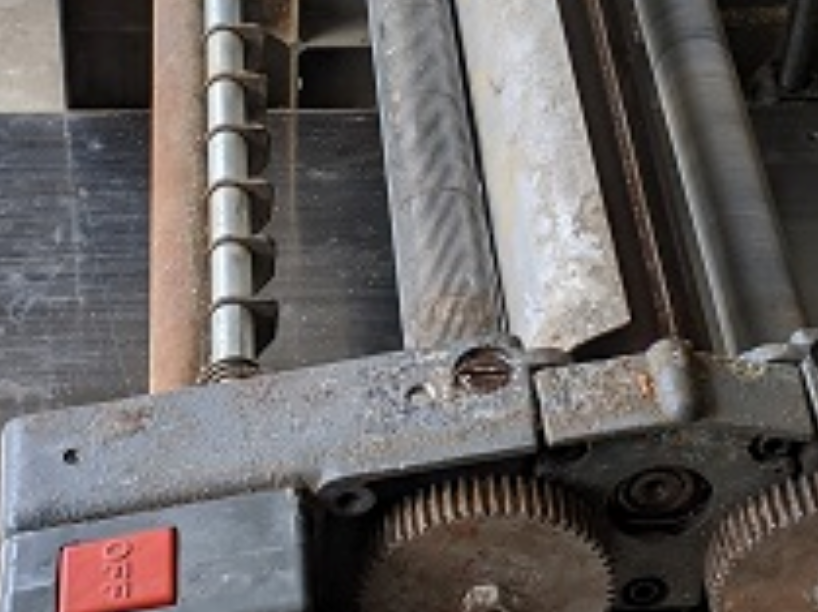
- Feedback Pawls and Infeed Roller
- Feedback Pawls and Infeed Roller.PNG (1.08 MiB) Viewed 8790 times
Unsubstantiated "suspect"....Outfeed Roller Assembly
Re: Pro Planer M5990 Outfeed issue
Posted: Mon Apr 13, 2020 11:23 am
by JPG
Dusty, we have to assume since the workpiece was stopped by the 'dangley teeth' that the feed was backwards(There are no dangley teeth on the outfeed side).
There are a bunch of squirrels running around in this thread.