Page 3 of 4
Re: Still Working on Image Presentation
Posted: Wed Dec 03, 2014 12:06 pm
by JPG
joedw00 wrote:I wish the font would wrap so I could see all the message without having to scroll over, or the large size of the image would be reduced. I don't see the use of the image being so big that you have to scroll down to see all of it.
An indirect advantage is the image can be copied in full resolution by any 'observer'.(like me

)
A direct advantage is there for folks with humongous displays.(that ain't me

)
FWIW Prosilver does not have the scrolling font 'issue'.
That said, we need to not get too comfortable with Prosilver. Admin has revealed that Shopsmith1(as eventually develpoed/fixed/. . . ) will be the 'supported' option. Have patience! I have complete confidence that Admin will strive to get it as good as he can. Give him time to get there!!!
Somethings may not be possible/practical. I am happy that the old software is gone and something SS can live with has replaced it.

Re: Still Working on Image Presentation
Posted: Wed Dec 03, 2014 1:59 pm
by admin
JPG wrote:
FWIW Prosilver does not have the scrolling font 'issue'.
That said, we need to not get too comfortable with Prosilver. Admin has revealed that Shopsmith1(as eventually develpoed/fixed/. . . ) will be the 'supported' option.
To clarify. The plan is to keep both options (and possibly add others).
ProSilver is updated by the phpBB group (and even if I wanted make changes to it, they would be overwritten by the next update). I plan to let it run unmodified.
Shopsmith1 is the default set-up (so that it fits the rest of the web site for new users). Bug reports and suggestions for it are very welcome.
For the font scrolling issue, I'll have to test further. So far I'm not getting the problem here, so I'm having trouble identifying it. If anyone can give specific steps (go to specific post and take specific action using specific browser), I'd like to try to duplicate it.
Re: Still Working on Image Presentation
Posted: Wed Dec 03, 2014 2:59 pm
by heathicus
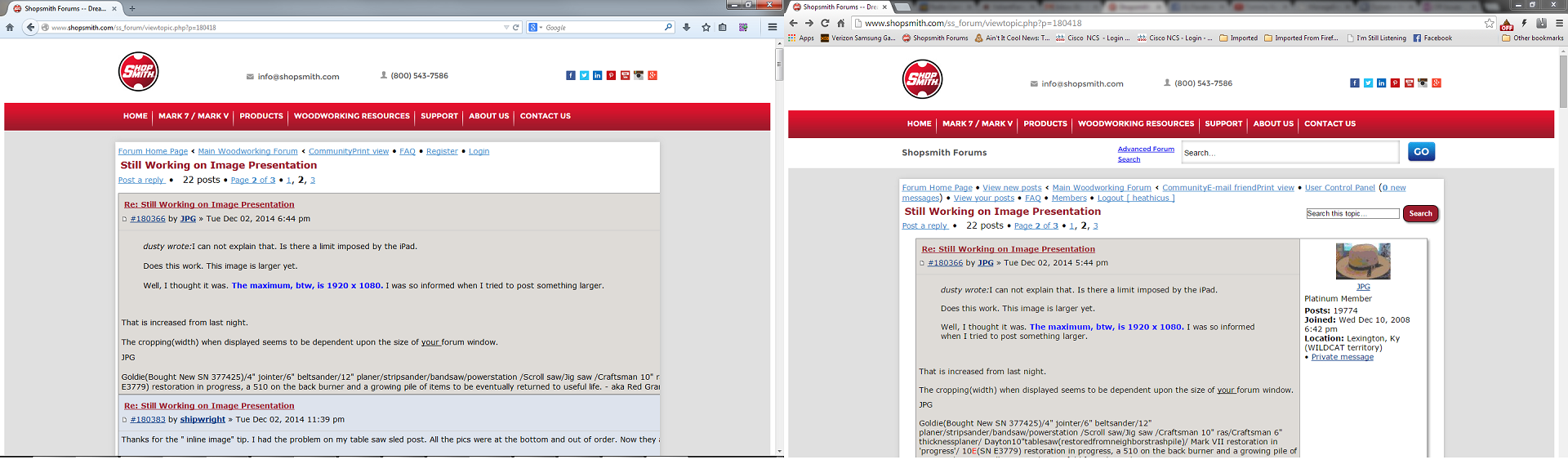
Here's a screenshot showing the problem. On the left is Firefox which has the "text wrapping" problem. On the right is Chrome which displays just fine.
- SS-forum1.png (354.73 KiB) Viewed 1824 times
This is related to large images.
In Firefox, the text area is expanded to the width of the image, but you can't scroll the window across unless you select text with the mouse and drag the mouse to the right side of the frame containing the text.
In Chrome, the image is sized down to fit the frame size. In Chrome on my computer, both Sketchup generated images that Dusty posted in #180395 as well as the one JPG posted in 180411 all appear exactly the same to me. They do appear different in Firefox. This is using the shopsmith1 style.
Using prosilver, the images appear different in Chrome. They take up the width of whatever actual size they are, but the height is set by the frame and scrolls up and down within that frame until clicked on then expands to the full height.
Re: Still Working on Image Presentation
Posted: Wed Dec 03, 2014 3:36 pm
by admin
Thanks. That was the clue I needed. I hadn't retested with Firefox recently.
I've put in a temporary workaround for now (posts look ok, but small pictures are shown too big). I'll check on what the actual mistake is and put in a real fix later.
Re: Still Working on Image Presentation
Posted: Wed Dec 03, 2014 4:16 pm
by algale
Using an iPhone 4s and Safari it is very difficult to read the forum using Shopsmith1 setting. Text is running off edge of page.
Re: Still Working on Image Presentation
Posted: Wed Dec 03, 2014 6:12 pm
by heathicus
Although I prefer the overall look and behavior of the prosilver style, I really like how the shopsmith1 style handles images. I may stick with that style just for that reason.
Re: Still Working on Image Presentation
Posted: Wed Dec 03, 2014 8:30 pm
by JPG
I dare say Admin was there!!!!
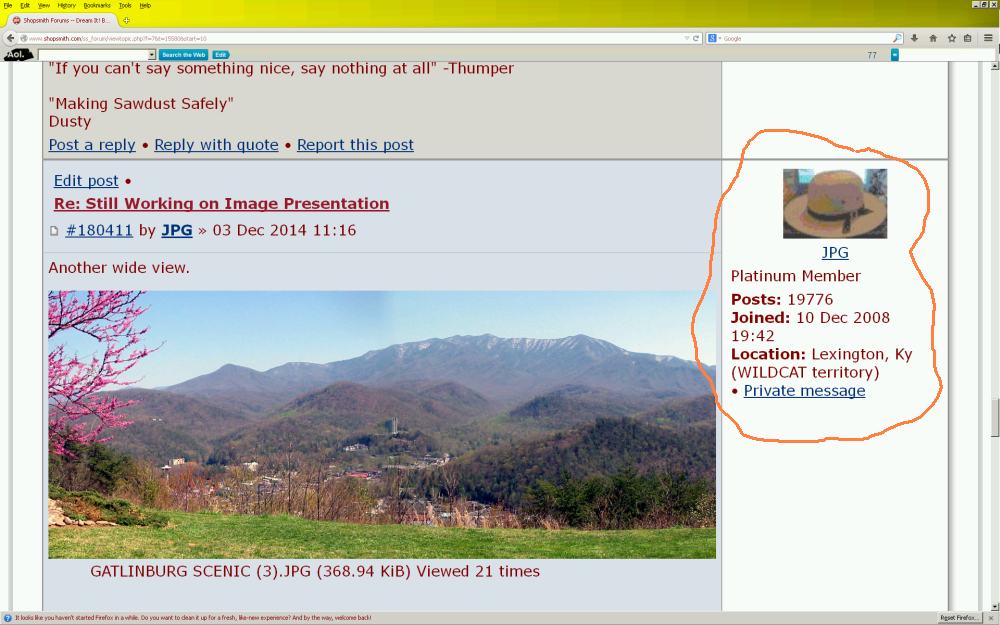
Now for another 'suggestion'.
- new forum screen waste.jpg (547.86 KiB) Viewed 1787 times
IMHO the circled part can be much much smaller. That would create more room for pix!
Re: Still Working on Image Presentation
Posted: Wed Dec 03, 2014 9:39 pm
by heathicus
I also wish that was on the left side since the flow of reading is left to right and I like to see who wrote a post before I look over to read it.
Re: Still Working on Image Presentation
Posted: Thu Dec 04, 2014 1:40 am
by rpd
heathicus wrote:I also wish that was on the left side since the flow of reading is left to right and I like to see who wrote a post before I look over to read it.
I prefer the avatar on the left side too, even better would be if it could in the header at the top of the post rather than in a separate frame.
Re: Still Working on Image Presentation
Posted: Thu Dec 04, 2014 2:29 am
by JPG
rpd wrote:heathicus wrote:I also wish that was on the left side since the flow of reading is left to right and I like to see who wrote a post before I look over to read it.
I prefer the avatar on the left side too,
even better would be if it could in the header at the top of the post rather than in a separate frame.
YES!