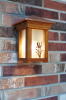
Earlier this week I started planning a bookshelf. My son saw this bookshelf on-line and asked me to make it for him as a 'house warming' gift for his new (99 year old house). You can Google it under "switchback bookcase".
I started work on it. At some point I know I decided there were too many construction lines floating around so I used the command to hide them. Then later I saved the file and went off to do something else. Today I started work on it again and my construction lines will not appear. If I try to make new construction lines, using the Tape Measure Tool, I'm having issues. If I double click on a line trying to get a construction line to extend passed the line I can't. If I try to pull a parallel to an existing line I can't. They all seem to disappear.
I started a new model and the tape measure tools works just fine! So obviously I've done something in my earlier model to screw things up.
So if any of you talented folks know what I should do please pass on the secret info and have nice day. Thank you!
Sketchup Problem
Moderator: admin
Sketchup Problem
New Leaf Custom Woodworking
Berry Conway - Chief Dust Maker
Berry Conway - Chief Dust Maker

Hi,berry wrote:Earlier this week I started planning a bookshelf. My son saw this bookshelf on-line and asked me to make it for him as a 'house warming' gift for his new (99 year old house). You can Google it under "switchback bookcase".
I started work on it. At some point I know I decided there were too many construction lines floating around so I used the command to hide them. Then later I saved the file and went off to do something else. Today I started work on it again and my construction lines will not appear. If I try to make new construction lines, using the Tape Measure Tool, I'm having issues. If I double click on a line trying to get a construction line to extend passed the line I can't. If I try to pull a parallel to an existing line I can't. They all seem to disappear.
I started a new model and the tape measure tools works just fine! So obviously I've done something in my earlier model to screw things up.
So if any of you talented folks know what I should do please pass on the secret info and have nice day. Thank you!
You are using the right method to show guide lines right? It is under the view menu.
X section planes
X section cuts
X axes
X Guides (must be checked to see guide lines)
I've never have them gone for good but then I guess it could happen???
Ed
That fixed it, didn't have Guides selected. Thank you so much!reible wrote:Hi,
You are using the right method to show guide lines right? It is under the view menu.
X section planes
X section cuts
X axes
X Guides (must be checked to see guide lines)
I've never have them gone for good but then I guess it could happen???
Ed
New Leaf Custom Woodworking
Berry Conway - Chief Dust Maker
Berry Conway - Chief Dust Maker